01 / THE CONCEPT BRIEFWhat the website needed to do.
Create a residential landscape design website that feels personal and considered. Help a visitor understand the practice, explore different garden types and see what happens before they enquire.
02 / DIRECTIONA calm first impression.
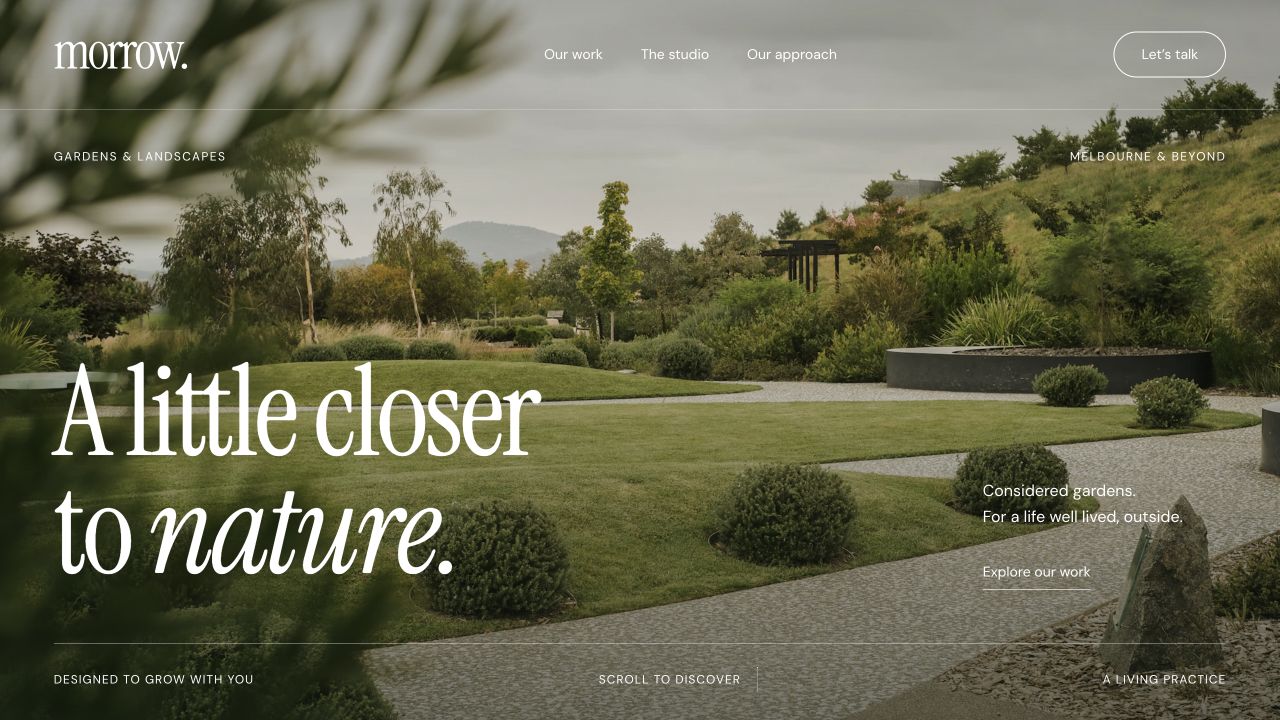
The opening garden photograph establishes the subject immediately. Generous spacing and a restrained green palette give the images room, while serif headlines bring an editorial tone. Short introductions keep the focus on the landscape rather than a wall of sales copy.
03 / STRUCTURELet the work do the explaining.
The home page introduces the practice and selected gardens. Dedicated work, studio and approach pages answer different questions: what does the work look like, who is behind it, and how does a project move forward? Project stories add the setting and design choices that a thumbnail cannot communicate.
04 / ENQUIRYA shorter path to a conversation.
Visitors can explore the portfolio before using the design-call or contact links. Enquiry prompts describe the next step so that browsing a garden does not end at an image gallery. This is a sample journey; it does not represent a real garden consultation service.
05 / RESPONSIVEThe same story on a smaller screen.
The concept includes mobile navigation and a compact bottom navigation for work, approach, studio and contact. The layout keeps photographs central while letting supporting text stack into a readable sequence. A real delivery would also verify the final content, accessibility and device behaviour against the agreed scope.
06 / CONTENTA structure ready for future projects.
A project collection is a natural fit for this type of site: title, location, garden type, cover image, story and gallery. Those are possible CMS fields for a commissioned version. This concept demonstrates the public website; a connected, client-managed CMS is not claimed here.
07 / BUILDA light, readable foundation.
Shared Node.js templates generate complete static HTML for the portfolio and project pages. Browser JavaScript adds filters, image viewers and navigation; locally hosted fonts and imagery keep those assets under the site’s control. The public pages can be read before the interactive layer loads.
The useful lesson.
A portfolio becomes more useful when each project has context and a next step. This concept demonstrates the design approach; no client traffic, enquiry increase or business results are claimed.
Explore the other concept